The platform

What AxiumOne does

An ERP platform your team shapes to the way it already works — configured in the browser, governed from day one, and running on infrastructure you choose.

Configure, don't code

Model your business, not a vendor's idea of it

Define what you actually work with — orders, assets, inspections, whatever your operation calls them — and the platform builds the tables, forms and grids to match.

Your own business objects
Add an object and its fields, and the tables, forms, grids and API appear with it. No release cycle, no developer.
Numbering and validation you control
Automatic document numbers, required and unique values, formats and input masks — set per field, enforced by the server.
Calculations and linked records
Totals that compute themselves, and fields pulled from a linked record — copied as at the time of the document, or always current.
Documents with headers and lines
Transactional documents with their own status lifecycle, so a posted order behaves differently from a draft one.
Rules and automation
Price and value lookups from decision tables, and actions that fire when a record is created, changed or reaches a status.
Stock movements, where you need them
Receipts, issues, transfers between branches and cycle counts, with balances kept per location.
Start from a working system, not an empty one
Export a set of business objects — with sample records — as a single file, and load it into a new installation in one step. A new site can begin with something that already looks like the business rather than with empty screens.
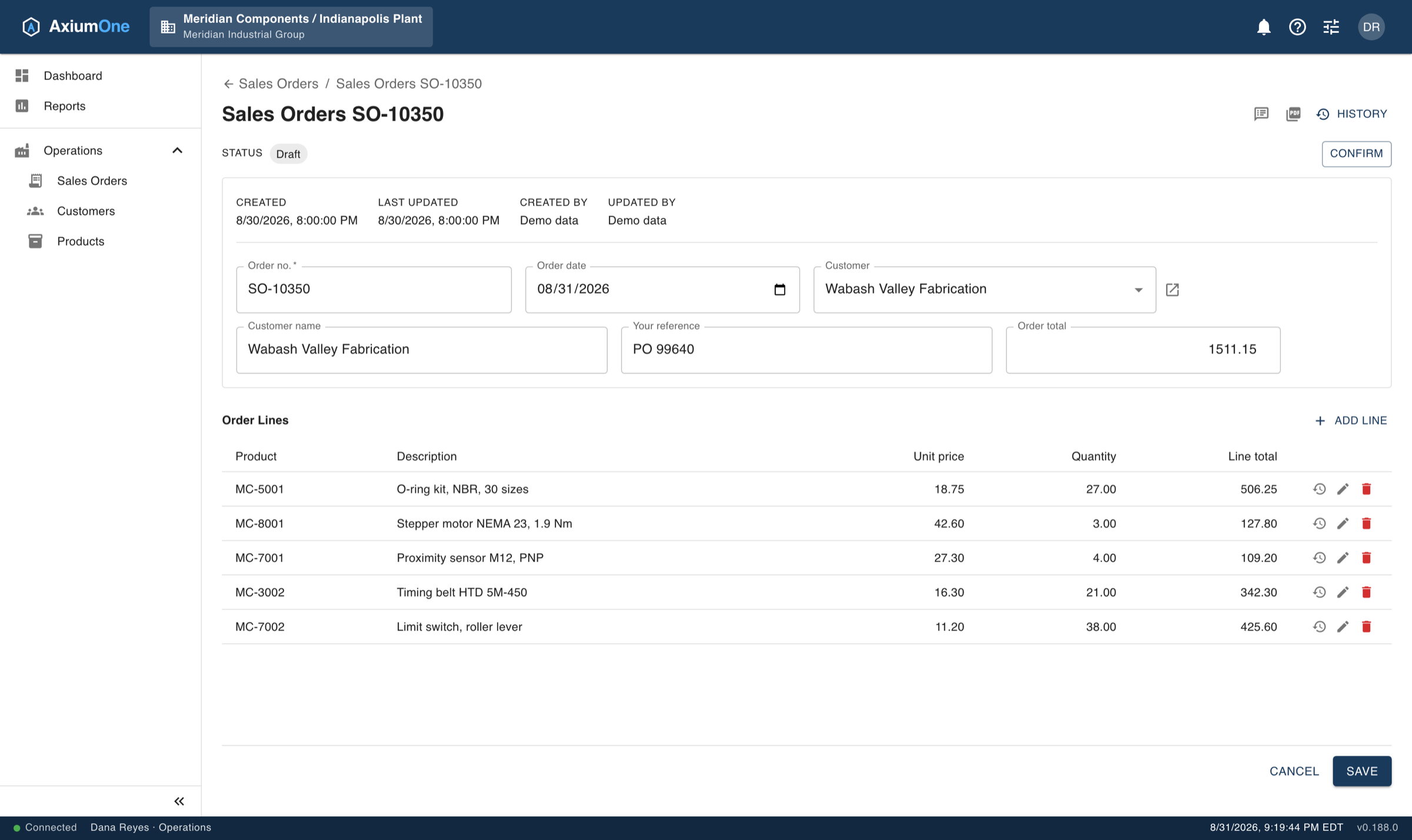
A sales order in AxiumOne: header fields including customer and order date, a Draft status with a Confirm action, five order lines with unit price, quantity and line total, and an order total calculated from the lines.
A sales order built from the pieces above: fields you defined, a status that gates what can happen next, lines of their own, and a total the server calculates rather than trusts.
Multi-tenant by design

Governance that was there from the first record

Separation between organizations, companies and branches is built into the foundation rather than bolted on — so who sees what is a setting, not a project.

Organizations, companies, branches
Every record carries its place in the hierarchy, and every query respects it automatically.
Access down to the field
Grant a role a whole object, or make one column read-only or invisible to it. Enforced on the server, not hidden in the browser.
Values only the right people see, and only on purpose
Mark a field sensitive and it stays out of grids, forms, exports and printed documents. Someone entitled to read it can reveal one record at a time; every reveal is written to the change history, and the value hides itself again after a few seconds.
A complete change history — and the record as it was
Every change to every record, with the old value, the new value, who made it and when. Pick any entry and see the whole record as it stood at that moment.
Conversations that stay with the work
Discuss a record without leaving it, with one person or a whole team. Anyone can pick a request up so that two people do not start it at once, and a conversation is never purged while it is still open.
A view across the whole company
Give oversight and reporting roles a read-only branch that sees every location at once, without the ability to change anything.
Two-factor authentication
Optional for users, enforceable for administrators or across an entire organization.
Single sign-on with your own directory
Sign in through Microsoft Entra ID. Switch password sign-in off and removing someone from your directory removes their access here too; leave it on and it stays as a way back in if your provider is unreachable.
Nothing disappears by accident
Deletions are recoverable, and an administrator can see exactly what a role can reach before granting it.
Scheduling

See the work in time, not only in a list

Any object you have modelled with a date becomes a calendar — the same records your team already works in, laid out across a month, a week or a single day. There is no separate scheduling module and no second copy of the data.

A calendar over anything you model
Choose which date drives it, and orders, jobs, inspections or site visits appear on a calendar of their own. Colour them by status, customer or whatever else matters.
Parallel resources, side by side
Split the day into lanes — production lines, bays, vehicles, engineers — and see what each one is committed to at a glance.
Reschedule by dragging
Moving a tile writes the new time back to the record itself, through the same validation and the same change history as typing it by hand.
Visible to the right people, by default
A calendar can only be seen by people already allowed to see the records behind it, and who may design one is a permission of its own.
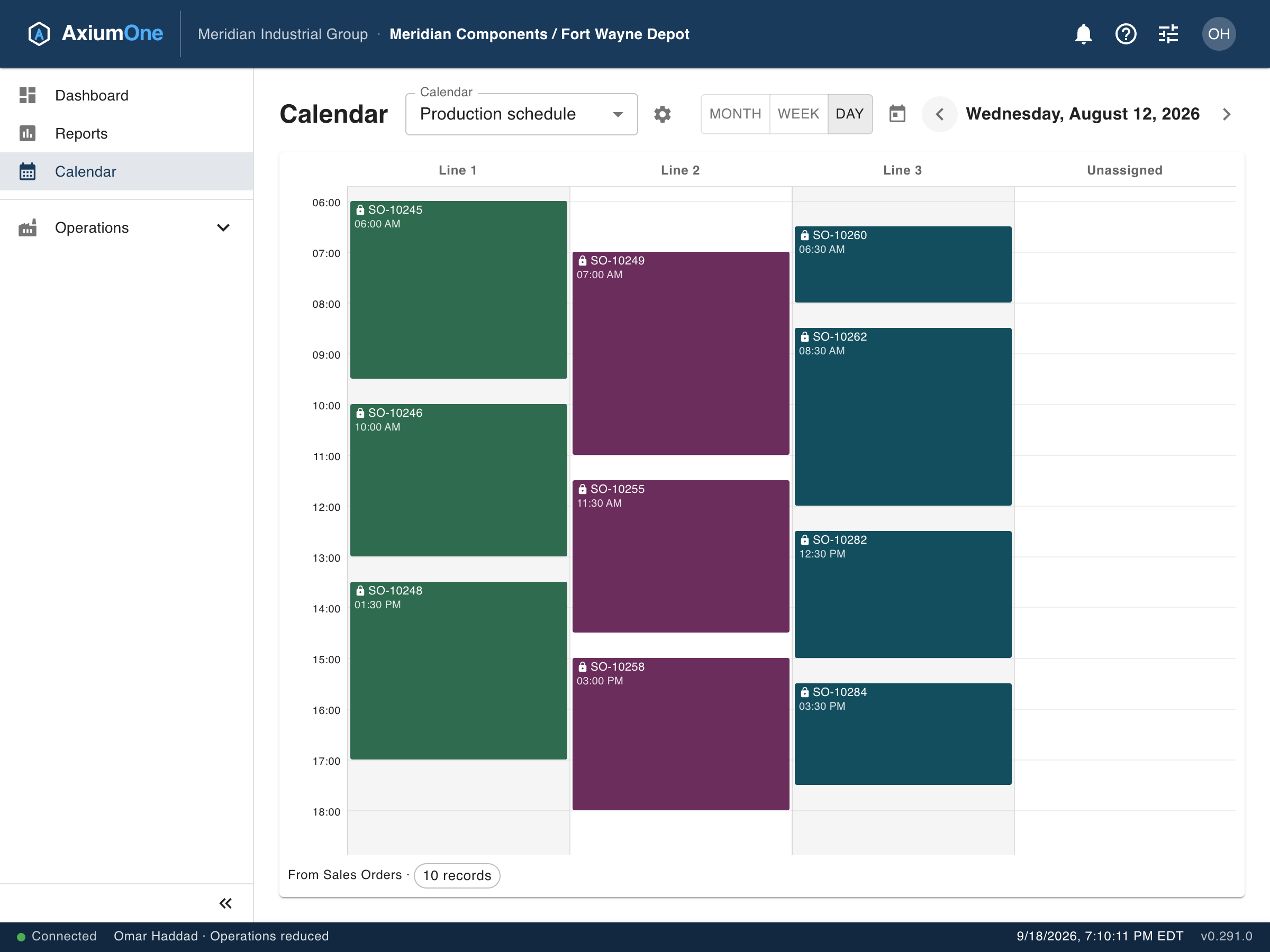
A day view in AxiumOne showing three production lines as parallel columns, each with several sales orders scheduled between 6am and 6pm, every tile as tall as the job is long.
One day across three production lines. Each tile is as tall as the job is long, and dragging one to another line reassigns it — on the same sales orders as the document above.
Insight built in

Answers from your own data, without a data project

Reporting runs over the same records your team works in every day — scoped to what each person is allowed to see, with no extract, no warehouse and no waiting.

Build a report without SQL
Pick columns, filter, sort, group and total. Save it, and share it with the roles that should have it.
Scheduled and delivered
Have a report run on a schedule and arrive by email, or post to another system automatically.
Figures on the dashboard
Live key figures with trends, shown to the roles that need them and scoped to each person's own context.
Documents on your letterhead
Print any record or report to PDF with your own logo and address, formatted for the reader's language and locale.
Your data stays yours

Software that talks to nobody but you

Where your data lives, and what touches it, is a decision you make — not one the software makes for you.

No telemetry, no tracking, no hidden connections
Nothing is ever sent to us. The application connects only to services you set up yourself: your mail server and, where you choose them, your sign-in directory, file storage, your own systems and the AI assistant. Each one stays off until you switch it on.
Real tables in a real database
Your data sits in ordinary SQL tables, readable by your own BI and reporting tools. Nothing is locked in an opaque format.
Hosted, or on your own servers
Run it as a service, or in your own data centre. The product is the same either way.
Open to your other systems
A REST API, keys for machine access, and webhooks that notify another system the moment something changes.
Backed up, and yours to take
Automated backups with off-site copies, and a full export of an organization's data whenever you ask for it.
Eight languages, and room for more
English, German, Spanish, French, Italian, Portuguese, Dutch and Polish — including the administration screens, not just the surface. Translations are data rather than compiled resources, so a further language can be added without a new release.
Everyone in their own time zone
Each person sees times where they are, and a scheduled report arrives at the local hour it was set for — on both sides of a daylight-saving change.
Built to last, not just to launch

Fast to set up. Still right years later.

New tools can write an application for every request. AxiumOne takes another route: one proven platform, configured to your business, so what you set up on day one stays consistent, governed and supported as you grow.

Every object gets the whole system
History, access down to the field, imports you can undo, reports, calendars, documents and eight languages — the moment you add it, not when someone thinks to ask.
The hard parts are already done
Document status and posting, stock per location, numbering, separation between companies — built into the platform and tested once, for everyone.
Improvements reach what you built
Each update applies to all your objects at once. Nothing to regenerate, re-test or describe again.
Changes you can review
Every change to the design is recorded, and the data model can be exported to Excel to discuss and sign off before it goes live.
AI that reads, and shows its working
The assistant answers from your records with each person's own rights, shows the query behind every figure, and changes nothing on its own.
Leaving is an export, not a project
Your data sits in ordinary SQL tables, hosted or on your own servers. It is yours to read, report on and take with you.

See it against your own process

The quickest way to judge a platform like this is to point it at something you actually do. Bring us a process and we will show you how it would be configured.

Book a demo